
How to Upload a Video to the AI Video Editor
How to Generate a Video from a Script or Prompt Using AI
Creating a video using AI is quick and easy. Follow the steps below to generate your video from a script or prompt.
Steps to Generate a Video
-
Go to Your Dashboard
Log in to your account and navigate to your dashboard.
-
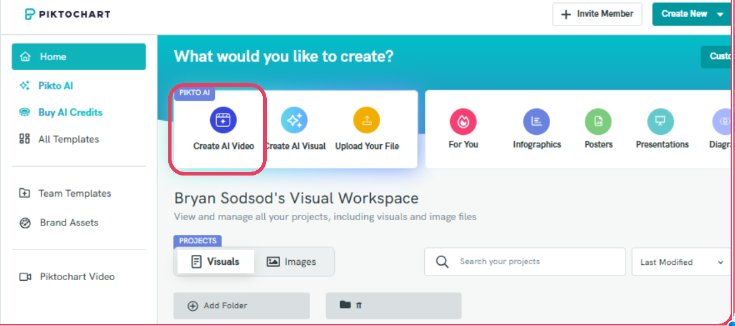
Click “Create AI Video”
Select the Create AI Video option to begin.
-
Enter Your Script or Prompt
Type or paste your script or prompt describing the video you want to generate.
Note: Make sure your account has enough credits before generating a video.

- Generate the Video
-
Click the generate button and wait for the AI to process your request.
Processing time may take a few minutes depending on the complexity of your prompt.
- Preview or Download Your Video Once the video is ready, you can:
- Preview the video
- Generate a new version
- Download the final video
PR
- Use clear and detailed descriptions in your prompt
- Specify style, mood, and actions for more accurate output
- Keep prompts concise but descriptive
Common Questions
Why is my video taking too long to generate?
Video generation time depends on the complexity and length of your prompt. More detailed or longer videos may take a few extra minutes to process.
What should I do if my video fails to generate?
Check if you have enough credits and try again. You can also simplify your prompt or refresh the page.
Can I edit my video after generating it?
You can generate a new version by modifying your prompt, but direct editing options may vary depending on the platform.
Why does my video not match my prompt exactly?
AI-generated content may vary slightly. For better accuracy, try using clearer and more specific descriptions.
Do I need credits to generate a video?
Yes, video generation requires credits. Make sure you have sufficient credits before starting.