
How to Pause Your Piktochart Subscription
Not ready to cancel but need a break? You can pause your Piktochart subscription instead. Pausing lets you step away temporarily without losing any of your work or having to start from scratch when you return.
What Happens When You Pause
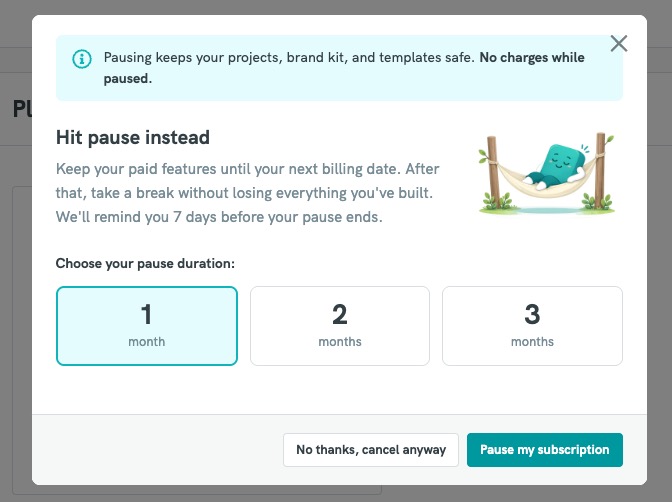
- Your data is kept safe - all your projects, brand kit, and templates are preserved throughout the pause period.
- No charges while paused - you will not be billed during your pause duration.
- Paid features remain active until your next billing date, after which the pause begins.
- You'll receive a reminder 7 days before your pause period ends, so you can decide whether to resume or take further action.
How to Pause Your Subscription
- Go to Account Settings.
- Navigate to the Billing or Subscription section.
- Select the option to cancel your subscription.
- When prompted, choose "Hit pause instead" from the modal that appears.
- Select your desired pause duration:
- 1 month
- 2 months
- 3 months
- Click "Pause my subscription" to confirm.
If you'd still prefer to cancel, you can select "No thanks, cancel anyway" from the same modal.
Resuming Your Subscription
Your subscription will automatically resume at the end of your chosen pause period. You'll receive an email reminder 7 days before this happens.
- Check your billing email inbox - notifications are sent to the email address associated with your billing account.
- Check your spam or junk folder - reminder emails may sometimes be filtered there.
- Whitelist Piktochart emails to ensure future notifications land in your inbox:
- In Gmail: Find an email from Piktochart, click the three-dot menu, and select "Filter messages like these" > "Never send to spam".
- In Outlook: Right-click a Piktochart email > "Junk" > "Never block sender".
- Other email clients: Add Piktochart's sending address to your contacts or safe senders list.
Frequently Asked Questions
Will I lose my projects or designs while paused?
No. All your projects, brand kit assets, and templates are safely stored throughout the pause period.
Will I be charged during the pause?
No. There are no charges while your subscription is paused.
Can I still access Piktochart while paused?
You will retain paid features until your next billing date.
What if I want to cancel instead of pausing?
You can still choose to cancel by clicking "No thanks, cancel anyway" in the pause modal.
How long can I pause for?
You can pause for 1, 2, or 3 months. If you need any adjustments, kindly contact customer support.